Windows XP Media Center

This is a place to discuss the latest Hardware and Software released.

Moderators: THE JEW (RaVeN), Ghost [PX]

Post Reply
User avatar
[Fallen]Thumperup
Posts: 2630
Joined: Sun Mar 23, 2003 9:05 am
Location: Woodstock, Ontario
Contact:

Windows XP Media Center

Post by [Fallen]Thumperup »

I found this out a long time ago but, since this is a sunday afternoon and I have nothing to do I decided to share this with the world and let you bitch about something new.

First look at this to understand what it is

If running 56K click below
http://www.microsoft.com/windowsxp/wmx/ ... emo56k.asp
If running High Speed click below
http://www.microsoft.com/windowsxp/wmx/ ... mo300k.asp

Windows XP Media Center Edition Top 10 Benefits
1.Easily access your entertainment experiences from one place
2.Watch your favorite shows whenever you want
3.Enjoy the convenience of a single remote control to access your entertainment
4.Experience the power of Windows XP
5.Transform your living space into a theatre
6.Easily find just the TV programs you want
7.Work hard, play hard
8.Watch and control live TV—and never miss a moment
9.Experience your music collection with the ultimate jukebox
10.Create your own digital media library

Here is how it works
Image
Comes with a remote
Image

A Few Questions you might have

What is Windows XP Media Center Edition?
A) A new member of the Windows XP family, Windows XP Media Center Edition is an operating system that brings together the best of computing and home entertainment. It transforms your PC into a Media Center that provides easy access to all your favorite digital entertainment experiences. Windows XP Media Center Edition is built on Windows XP Professional and provides you with the same power, reliability, and security enhancements.

What is a Media Center PC, and what kind of hardware components does it include?
A) A Windows XP Media Center Edition PC is a complete personal computer that both runs Windows XP Media Center Edition and is equipped with the hardware required to deliver powerful computing and rich home entertainment experiences.

Most Media Center PCs are outfitted with powerful processors, high-capacity hard disks, CD-ROM/DVD drives, and rich graphics and audio capabilities. In addition, Media Center PCs include a remote control and TV tuner card, and might also offer features that enable you to connect the PC to your home entertainment system.

Can I connect my Media Center PC to a 5.1 Surround Sound Receiver?
A) Depending on the sound card installed in your system, you might be able to connect to a 5.1 Surround Sound receiver. Note that additional configuration might be required. PC manufacturers are shipping many configurations, which can include a speaker and sound card combination, in addition to 5.1 Surround Sound support. Check with the individual Media Center PC manufacturers for information on how you can purchase a Media Center PC with the capabilities you want.

For More FAQ's Go to
http://www.microsoft.com/windowsxp/medi ... on/faq.asp

All Info taken from Microsoft's site.
Last edited by [Fallen]Thumperup on Sun Apr 13, 2003 2:51 pm, edited 1 time in total.
User avatar
[Fallen]Thumperup
Posts: 2630
Joined: Sun Mar 23, 2003 9:05 am
Location: Woodstock, Ontario
Contact:

Post by [Fallen]Thumperup »

This is MY Argument against it.

My computer now does everything the Xp Media Center does and maybe even more.

I wish I knew what video they use, and other hardware.

I actually think the video card that I have could do more then what Microsoft is offering.

Card Shot
Image

Hook ups
Image

Pretty Controler
Image

My board also has the 5.1 Souround Sound that Microsoft does not have unless you buy added on top.
User avatar
[Fallen]Thumperup
Posts: 2630
Joined: Sun Mar 23, 2003 9:05 am
Location: Woodstock, Ontario
Contact:

Post by [Fallen]Thumperup »

I found more info on this Media PC from Microsoft.

Image

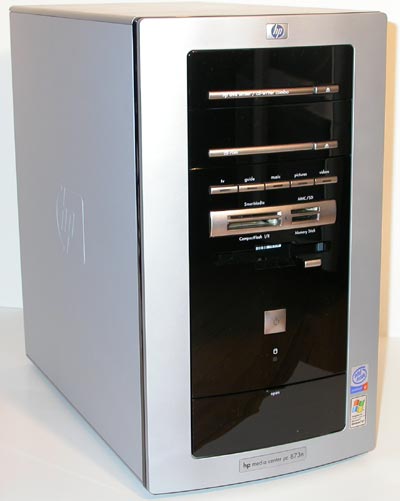
The HP Media Center PC 873n comes with a 2.53GHz Pentium 4 on an 845G motherboard made by FIC with 512MB of DDR266 SDRAM. You'll also find a SB Audigy and 56K modem on the inside of the PC, along with onboard Ethernet. This particular configuration came with a DVD writer and a regular CD drive as well. The power button has a blue LED behind it that glows quite brightly, which can be a problem in a very dark room if you don't want to attract a ton of attention to the PC.

HP also bundles the system with a universal memory reader accessible from the front of the PC; the reader will accept SmartMedia, MMC/SD, Memory Stick and CompactFlash cards. It's too bad that MCE won't recognize a memory card with pictures on it and let you browse it in the Media Center interface. HP completes the package by bundling a set of Klipsch Promedia 2.1s with the machine.

There's nothing too special about the design or assembly of the PC, other than the fact that it is very quiet thanks to a large heatsink on the CPU and a large, slow spinning fan.

The system comes with a GeForce4 MX by default, which unfortunately means that the best video output you can get is via a S-Video cable; no component out here, not without upgrading the system yourself to an All-in-Wonder Radeon 8500/9700.

A review on this machine
http://www.anandtech.com/showdoc.html?i=1766&p=1
User avatar
THE JEW (RaVeN)
Posts: 12499
Joined: Sun Mar 23, 2003 2:52 pm
Location: Bethlehem ;)
Contact:

Post by THE JEW (RaVeN) »

Differences?

1). MS uses a hardware encoder & decoder; you only have hardware decoder

2). Yours comes at a fraction of the price.

3). If you install Hauppauges' PVR 250 you would have the MS Media centre.

Ati was actually kinda peeved about this cuz the AIW 9700 actually does do hardware encoding partially, but MS wouldn't develop support for it. Overall, Pinto you do have the better setup.
If I remember correctly (I, too, knew about this a while ago), MS uses a IR remote while Ati uses RF remote. Though, you can buy the Ati remote separate to negate that advantage.


p.s. Homey B may be interested in this with his remote. All of the functionality of Pinto's remote, but a fraction of the price for us IR remote guys:

http://www.mediatexx.com/

I haven't tested it yet so no word on its stability/functionality. Though, it was recommended by Sudhian.
******* /=========\Image
****(_]/_____________\[_)
***** /(__)==JEW==(__)\
***** |=o__________o=|
***** |_|====---====|_|
Image
¨˜”°º•[K]•º°”˜¨
User avatar
THE JEW (RaVeN)
Posts: 12499
Joined: Sun Mar 23, 2003 2:52 pm
Location: Bethlehem ;)
Contact:

Post by THE JEW (RaVeN) »

Ati just released a patch that let's their AIW series run this.
******* /=========\Image
****(_]/_____________\[_)
***** /(__)==JEW==(__)\
***** |=o__________o=|
***** |_|====---====|_|
Image
¨˜”°º•[K]•º°”˜¨
Post Reply

Return to “Computer Hardware & Software”